Get the Values for the Default Fields
Recommended reading:
- For information on default fields, see Communications Default Fields
- For lists of default fields and the values they hold, see the CMP
 Converged Monetisation Platform. The MDS Global product that supports customer care and billing for digital service providers. Configuration Overview guide.
Default fields contain customer-specific attributes stored in the CMP database. This customer In the context of the Cloud Monetisation Platform, an individual or organisation who has signed an agreement to take goods and services from a service provider. A customer receives a bill associated with one or more subscriptions, and can be a single end user or a large company with many subscriptions assigned to one agreement. data can be merged into communications. For example, a customer account In the Cloud Monetisation Platform, a billing entity that can be used to manage payments on one or more subscriptions or payments for services. An account can hold details such as payments or invoices. number and account balance can be sent in a bill reminder SMS Short Message Service.
A text messaging service component of most mobile telephone systems. SMS uses standardized communication protocols to enable mobile phone devices to exchange short text messages.. For PUSH, SMS and ONLINE communications, the messages and their associated default beans are configured in the Business Configuration A module in the CMP Administation console that provides for viewing and modification of business and user applicable system configuration. console, as shown below:
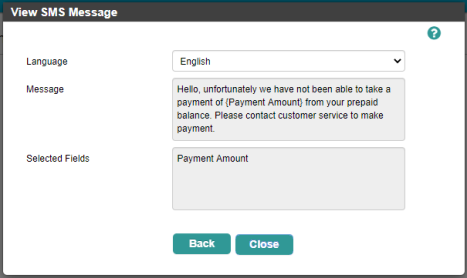
An SMS message that includes the {Payment Amount} default field
Some communication formats, for example letters and emails, must be associated with an additional external template that determines the format, style and layout of the correspondence. However, the default fields that can be incorporated into these templates are still configured in the Business Configuration console:
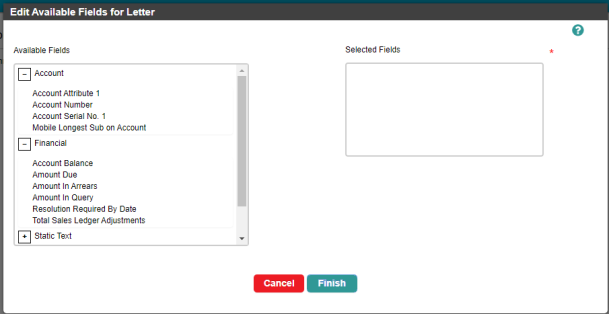
Configuring the available default fields for a letter
So the Comms Monitor job must retrieve the values of the default fields for all comms.
Each default field is associated with a bean, which is the software object that retrieves the customer information for the default field from CMP. One or more parameters are configured for the bean, which tell the bean exactly what information to retrieve.
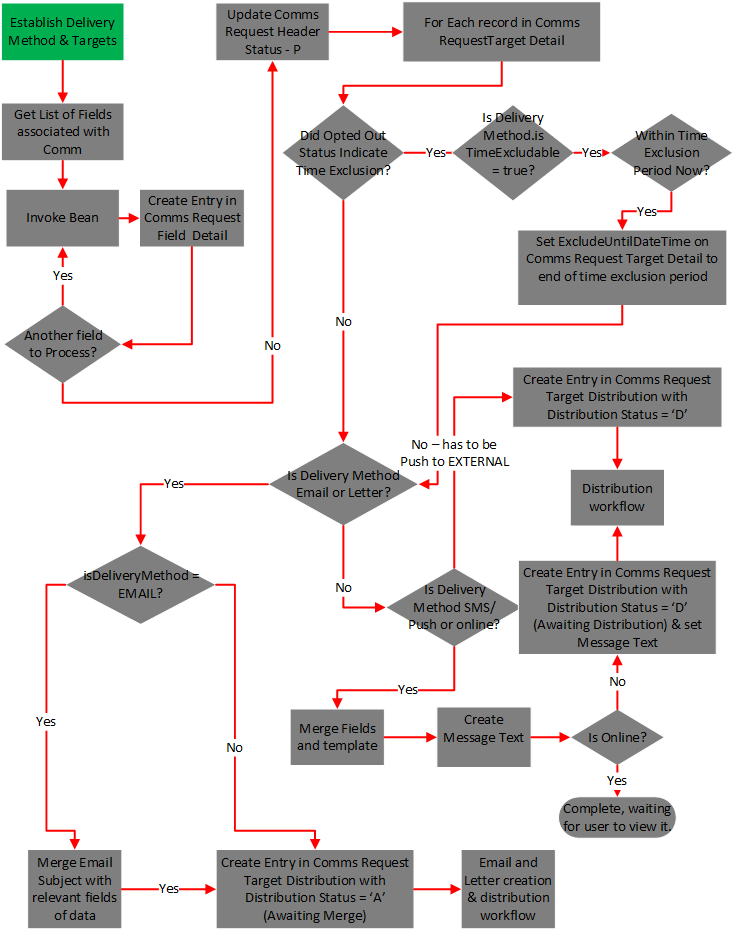
In the case of push notifications, online notifications and SMS delivery methods, the job also merges the data of the derived fields with the message template to produce the actual message. For letters and email, this merging is carried out by separate jobs. The workflow is as follows:
- The Comms Monitor job writes a record into the CommsRequestFieldDetail table.
- The job gets a list of fields associated with the comms.
- The job invokes the relevant beans used by the default fields to populate the CommsRequestFieldDetail table.
- The job repeats step 3 until the list of fields is complete and then it updates the RequestStatus in the CommsRequestHeader table to P (Processed).
- Then the job checks for time exclusions (see Checking Time Exclusion).
- The job checks the CommsCodeLanguage table to identify which Message value should be used for the comm.
- For EMAIL and LETTER, once the job has processed time exclusions, it creates an entry in the CommsRequestTargetDistribution table with the DistributionStatus of A (Awaiting Merge). Another job and daemons are responsible for merging email and letter templates with default field values and sending the comms.
- For SMS, PUSH and ONLINE, once the time exclusions are processed, the job sets the Message value in the CommsRequestTargetDistribution table with the correct merged field (CommsFieldCode and TextValue from CommsRequestFieldDetail table) and sets the DistributionStatus to D (AwaitingDistribution).
Checking Time Exclusion
Customers may want to exclude getting communications during certain hours. To support this, customers are able to set exclusion periods for receiving comms. If they have set up an exclusion period, this can be ignored for certain comms.
The delivery method has a flag called isTimeExcludable. This is used to determine whether a particular delivery method is to be time excludable or not. For example, LETTER is usually not time excludable because it doesn’t really matter when it is sent, as it doesn’t concern the customer. However, an SMS is usually time excludable because the customer may not want to receive them late at night.
For each record in the CommsRequestFieldDetail table, the Comms Monitor job checks whether a time exclusion has been set.
If the isTimeExcludable flag = True on the delivery method that is derived then the job executes the following logic:
- If there is a time exclusion set on the CustomerCommsProfile table, the job checks whether the current time is within that exclusion period and then checks whether isAllowTimeExclusion is set to True on the CommsPreference table. If it is, then the job sets the ExcludeUntilDateTime on the CommsRequestTargetDetail table to the TimeExclusionEnd value that is on the CustomerCommsProfile table.
- If isTimeExcludable= False on the CommsDeliveryMethod table, or if there is no time exclusion set on the CustomerCommsProfile table, or if isAllowTimeExclusion is set to False on the CommsPreference table, or if the current time is outside of the time exclusion, then the job does not set ExcludeUntilDateTime on the CommsRequestTargetDetail table.
- Any comms requests raised outside of the Exclude Start/End times are processed immediately and the value of the ExcludedUntilDateTime field is set to Null when creating the record in the commsRequestTargetDetail table.
The following diagram shows the workflow and logic for getting the value of the default fields:
Click the thumbnail to view the full-size image.